
System Status
Logs
Read and download the log tail of C21 Live Control and its managed Encoders, filtered by file and severity, with a separate verbose debug view.
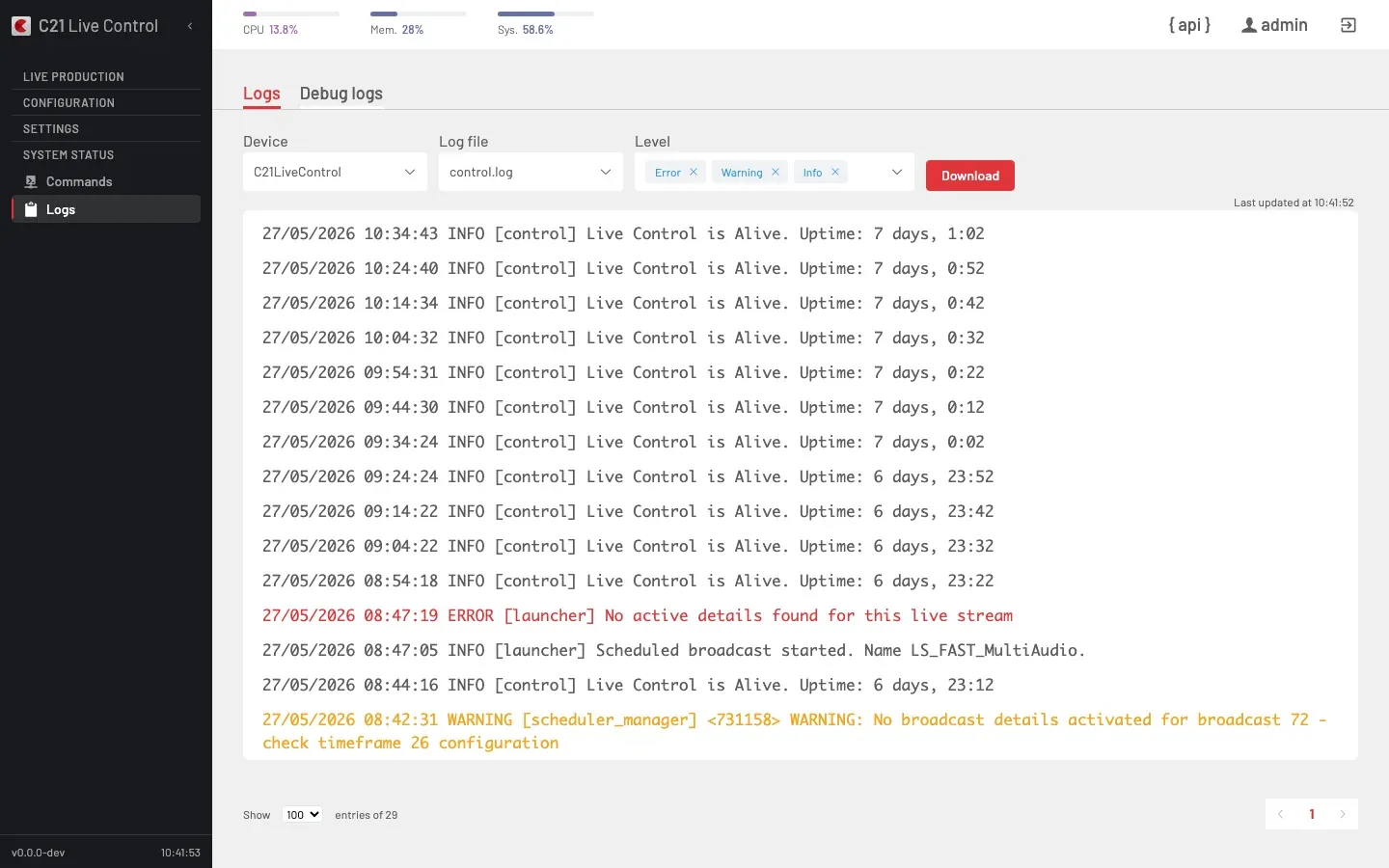
What it does
System status → Logs reads the log tail of any Device this C21 Live Control instance manages — the Control host itself or a registered Encoder — straight in the browser. The view polls for new lines (a "Last updated at …" timestamp shows the last refresh) and lets you filter by severity and download the full file.
Two tabs split the everyday log from the verbose one:
- Logs — the operational log (
control.log): start/stop events, scheduler activity, warnings and errors. This is the tab you read day to day. - Debug logs — the verbose diagnostic log (
control.log.debug): low-level internal trace, useful when working through an issue with Cires21 support. Much higher volume; paginated.
UI Interface
| Control | Purpose |
|---|---|
| Device | Whose log to read — this Live Control instance or a registered Encoder. |
| Log file | The log file on the selected Device (control.log on the Logs tab, control.log.debug on the Debug logs tab). |
| Level | Severity chips — Error, Warning, Info — filter which entries are shown. Remove a chip to hide that level. |
| Download | Downloads the selected log file. |
| Show N entries | How many lines to fetch per page (default 100). |
| Pagination | Pages back through the file beyond the current window. |
Entries are color-coded by severity (Info neutral, Warning amber, Error red) and prefixed with their timestamp and the emitting component.
API surface
The view polls a single endpoint for the tail, selecting the Device by ip (the Control answers on 127.0.0.1; an Encoder on its LAN address):
| Action | Request |
|---|---|
| Read the log tail | POST /c21apiv2/system/command — { "action": "readLog", "ip": "<device-ip>", "file": "control.log", "numLines": 100, "offset": 0 } |
fileiscontrol.logfor the Logs tab andcontrol.log.debugfor the Debug logs tab.numLinesmaps to the Show N entries selector;offsetadvances the pagination window.- The Device picker is populated by
GET /c21apiv2/devices?includeControl=1.
Cross-links
- Commands — run maintenance commands on the same Devices.
- Devices — register the Encoders whose logs appear here.
- Install C21 Live Control —
livecontrol logsreads the same log on the host.
FAQ
Logs (
control.log) is the operational log you read day to day — broadcast lifecycle, scheduler activity, warnings and errors. Debug logs (control.log.debug) is a verbose, high-volume diagnostic trace meant for troubleshooting an issue with Cires21 support.Yes. Pick the Encoder in the Device selector; the tail is read from that Device. The picker lists the Control plus every registered Encoder.