
Overview
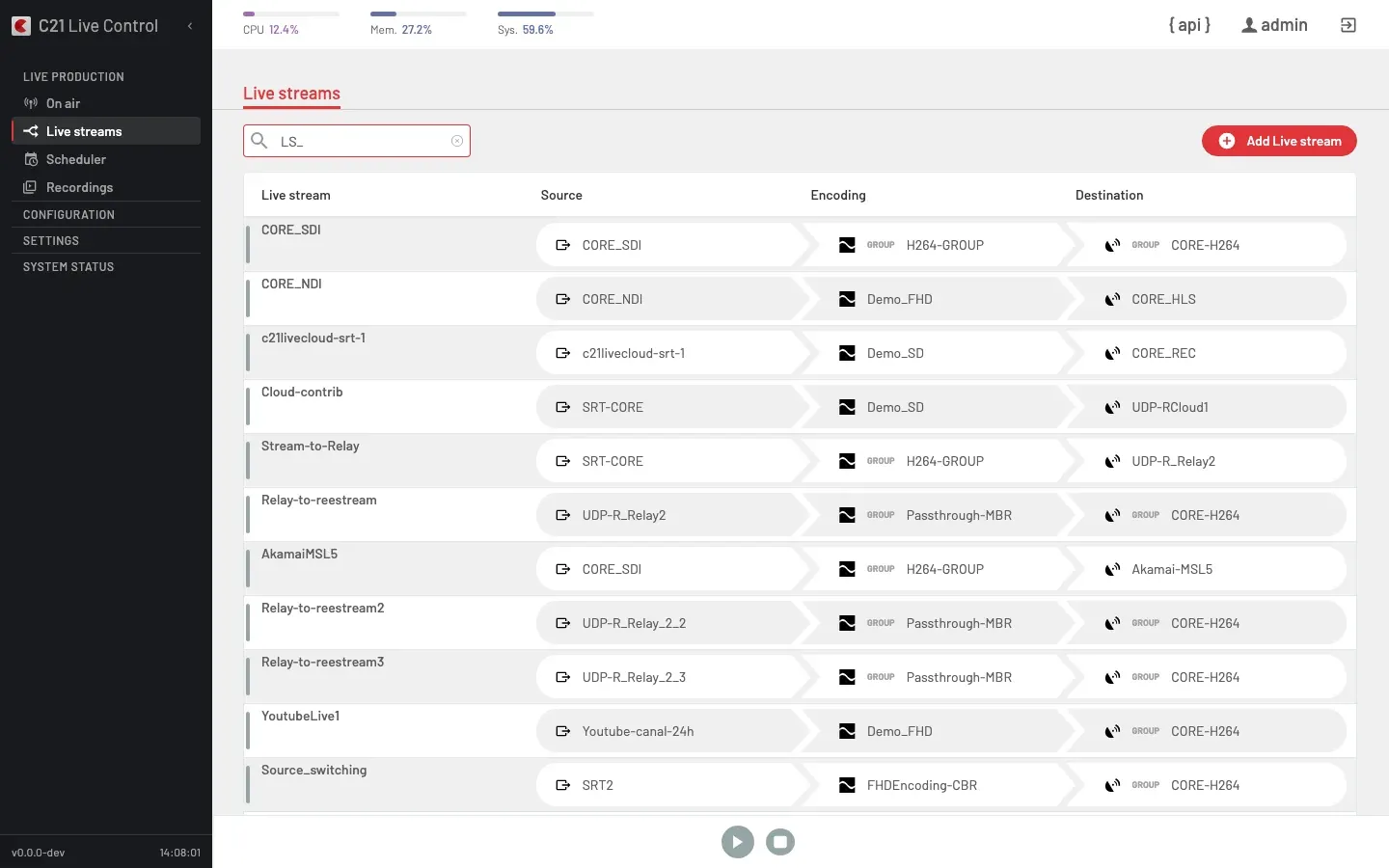
The Live streams list is the catalogue of every broadcast definition known to C21 Live Control. It is the entry point for Operators driving manual broadcasts and for Live streams arrived at from a Schedule.
List view
The list shows one row per Live stream with four columns — Live stream, Source, Encoding and Destination — plus a coloured vertical strip on the left edge of the row that reflects the runtime status. The encoder and slot the broadcast targets surface as a subtitle under the Live stream name. The toolbar action Add Live stream opens the editor.
To open the detail panel of a row, double-click it — see Live stream options.
How it works
Create
Open Add Live stream and fill in the editor:
- Name — display name reused across the UI, API and logs.
- Stream is enabled — toggle that gates whether the Live stream is available to start.
- Source — the Channel that feeds the broadcast.
- Encoding — one Encoding or one Encoding group (ABR ladder).
- Destination — one Destination or one Destination group.
When the editor is in AV1 mode the "Destination groups" option is disabled with the alert "For AV1 encodings no destination groups are allowed". When the bound Channel is NDI a second alert reminds you that every encoder in the bound group must see the NDI source for proper reassignment.
Schedule
Optionally bind the Live stream to a Schedule under the Scheduler section so it starts and stops automatically. See Scheduler for recurrence rules and conflict resolution.
Start
A Live stream can be started from the list view, from the detail view, by a Schedule firing, or by an API call against startLivestream. Before sending the start the client should call getLivestreamStartConfig to obtain a valid idEncoderGroup and a startConfig[] reconciled against the Destination group's current membership.
Monitor
Once running, the runtime status of the Live stream surfaces in real time, with per-stage indicators for the input Channel, the Encoding and the Destination. The full runtime-ops surface (logo, blackout, source switch, Destinations toggle, text overlay, metadata, ad-values) lives under On air; the same operations can be deferred to a fixed instant with a planned action.
Stop
Stop the Live stream from the detail view, from the row in the list, by a Schedule ending, or by a stopLivestream API call. After the stop the editor unlocks again.
Runtime status
The API exposes two independent fields on a Live stream: status (the binary on/off persisted state) and errorstatus (the encoder's runtime health snapshot). They move independently — a Live stream can stay at status: 1 while its errorstatus transitions between OK, ERROR and back.
status — running or not
LiveStream.status is binary: the backend persists 0 when the broadcast is off and 1 when it is on. Any value greater than 1 the API receives is clamped to 1. The UI maps it to a single badge in the detail panel.
status | Meaning | UI (detail panel) |
|---|---|---|
0 | Off | The status panel reads "Off". The editor is unlocked. |
1 | Live | The status panel reads "Live". The editor is locked. |
errorstatus — health snapshot
LiveStream.errorstatus is a separate field that carries the encoder's most recent health probe. It folds both the input state and each enabled Destination's ingest state, so a Destination that stops ingesting (a YouTube target going down, for example) moves the snapshot off OK instead of leaving it green. It is what the Live streams list's left-edge strip and the per-entrypoint indicators on the row reflect — not status.
errorstatus | Meaning |
|---|---|
0 | None — no health signal reported yet. |
1 | OK — the input is healthy and every enabled Destination is ingesting. |
2 | ERROR — the input is lost, or no Destination in the broadcast is reachable. |
3 | WARNING — half-error: some Destinations are down while others keep publishing, or a YouTube Live input is on hold (see Ingest a YouTube Live broadcast). |
5 | DEPLOY — a C21 Live Cloud broadcast is still provisioning its cloud encoder. |
A single Destination going down never turns the whole Live stream red on its own — it shows as a warning while the broadcast still publishes elsewhere. Over the API and MCP, GET /livestreams/{id}/status reports this health for each running entry, together with the per-destination ingest state under publishing_info.connections[].
Common options
| Option | Description |
|---|---|
| Name | Display name. |
| Description | Free-form notes. |
| Source | The bound Channel. |
| Encoding | One Encoding or one Encoding group. |
| Destination | One Destination or one Destination group. |
| Stream is enabled | Disable a Live stream without deleting it. |
Recording on a Live stream is configured by adding a Record-type Destination to one of the bound Destination groups (or by binding a single Record Destination). There is no separate on/off flag on the Live stream itself.
FAQ
Record-type Destination (or a Destination group whose members are all Record). The Live stream still runs against the encoder and writes the recording, but no outbound network publication takes place.