
Introduction
What it is
C21 Live Control is the software that orchestrates the Cires21 streaming platform. It is the operator's seat for everything that happens between an incoming signal and a delivered stream: define the Live stream, schedule it, drive it on air, capture it, edit a clip from the capture, and deliver to every destination the broadcast targets.
Live Control does not encode by itself. Encoding, packaging and contribution run on C21 Live Encoder instances — bare-metal, virtual, or cloud-hosted on C21 Live Cloud — that Live Control commands over the same control plane that powers its UI. Operators manage one Encoder or a fleet; the experience in Live Control is the same.
What you do with it
- Define a Live stream — bind a Source (Channel), an Encoding (or an Encoding group for ABR delivery), one or more Destinations (Destinations, optionally combined in Destination groups) and the C21 Live Encoder Device that will run it.
- Schedule it or start it on demand — recurring Schedules (
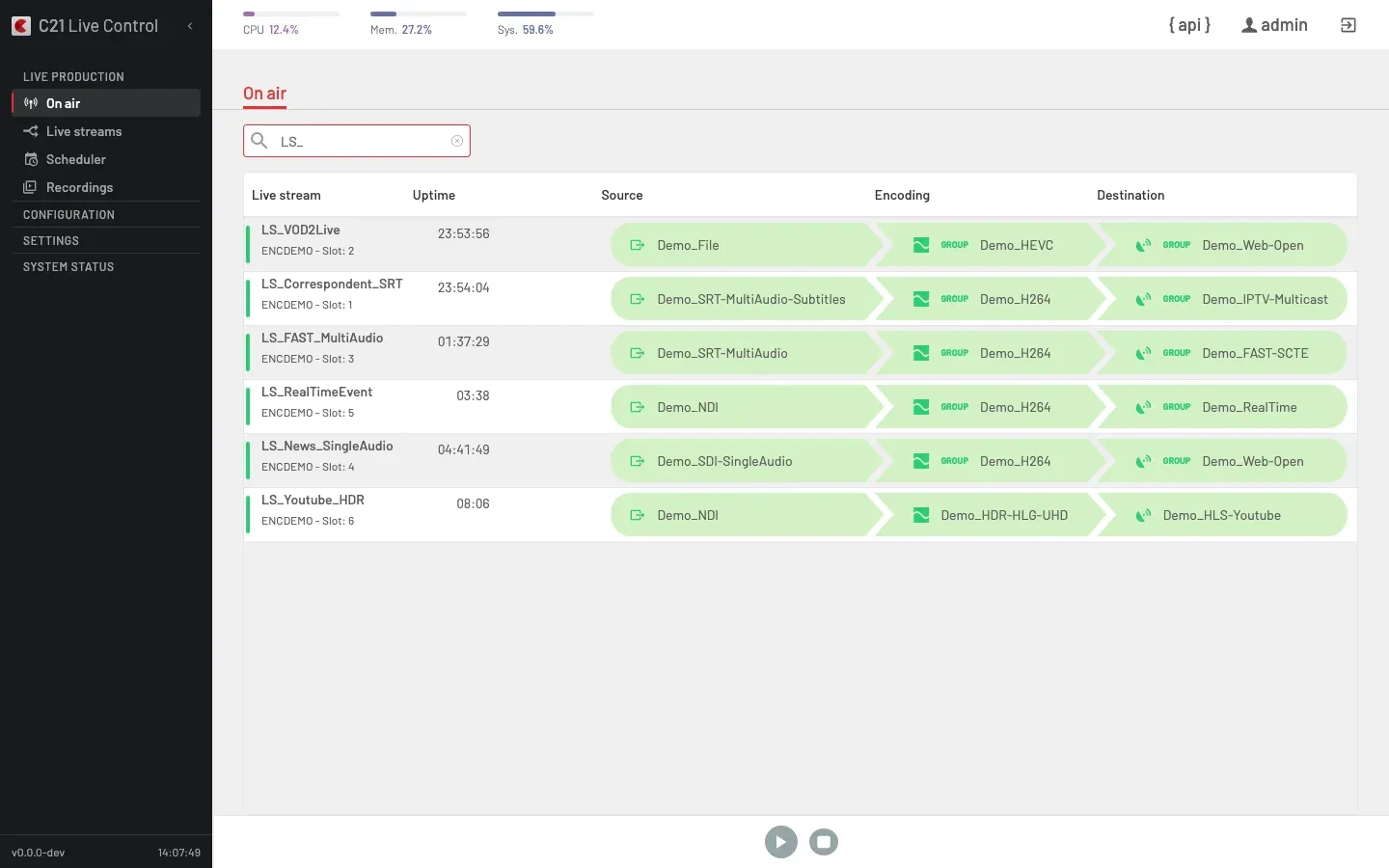
daily,weekly,workdays,weekend, ornonefor one-offs) or manual starts from the Live stream detail or the On air view. - Drive it on air — On air shows every running broadcast at a glance. From the per-stream runtime panel, switch the live source, apply a logo overlay, set a text overlay (ticker / crawl), blackout the output, push metadata / SCTE / ID3 markers, and toggle individual Destinations on or off without taking the broadcast off the air.
- Reach every audience — RTMP, SRT, HLS / TS, DASH, CMAF (including DRM-protected delivery with Widevine, PlayReady and FairPlay), MPEG-TS over UDP, SDI, NDI, and the cloud-flavoured variants that ride on a C21 Live Cloud account.
- Capture and edit — produce a Recording in lockstep with the live publish chain, then open it in the in-product Recordings Editor to cut clips, pick audio tracks and export — locally, to a remote storage target or onward to MediaCopilot for transcription, subtitling and clip generation.
- Integrate — every operation exposed in the UI is reachable through the REST API at
/c21apiv2and through the MCP server, with one bearer token authenticating both surfaces.
Who it's for
- Broadcasters and television channels — 24/7 channel operation from studio with multi-audio, subtitling (DVB Teletext and OP-47) and SCTE-35 ad signaling end-to-end.
- Sports, news and event productions — Reliable remote contribution (SRT, UDP-R, MPEG-TS) with sub-second latency and mid-broadcast source switching for multi-camera and remote-guest workflows.
- OTT platforms and streaming services — DRM-encrypted multi-format delivery (HLS, DASH, CMAF), fan-out across multiple Destinations and MediaCopilot integration for transcription, subtitling and automatic clip generation.
The two internal roles (System Administrator and Operator) that govern UI access are documented under Users.
What's in the box
The left rail mirrors the product's four sidebar groups.
Live production — the day-to-day broadcast surface:
- On air — every Live stream currently broadcasting (or provisioning on the cloud) with a status indicator plus per-row Live stream, Uptime, Source, Encoding and Destination columns, and a runtime panel for source switch, logo, blackout, text overlay, metadata push and per-publishing toggle.
- Live streams — the catalogue of every broadcast definition; list view plus a detail view with Source, Encoding, Destinations, Recordings and Events.
- Scheduler — calendar of scheduled and recurring broadcasts driven by the real
Recurrence.typeenum (none,daily,weekly,workdays,weekend). - Recordings — captures produced by Live streams, openable in the Recordings Editor to cut clips and export.
Configuration — the building blocks a Live stream binds together:
- Sources — Channel catalogue: SDI, AES/EBU, NDI, SRT, Stream (HLS / RTMP / HTTP / RTP / UDP multicast pulls), Stream – C21 Live Cloud (RTMP / SRT / UDP-R push variants), File and Youtube Live.
- Encodings — Encoding profiles and Encoding groups (ABR ladders).
- Destinations — Destinations (output endpoints) and Destination groups.
- Devices — registered C21 Live Encoder instances and their groups.
Settings — accounts, access and platform configuration:
- Users — user accounts and user groups; the two roles above gate access.
- Security — password policy, session and authentication hardening.
- Assets — files managed by Live Control:
logos,files,clips. - External Storage — Remote Folders and Target Folders for capture sources and delivery targets.
- Integrations — MediaCopilot, C21 Live Cloud, DRM providers.
System status — operational state:
- Commands — the queue of asynchronous operations dispatched to the Encoders.
- Logs — system and operation logs for troubleshooting and audit.
API and MCP server
The REST API exposes every entity above and is documented under Developers → API. The MCP server exposes a curated toolset to any MCP-compatible AI agent or automation — see Developers → MCP server. The two surfaces share the same authentication and the same audit log.
What you'll find here
- Quickstart — first Live stream end to end, from a configured environment.
- Concepts — domain glossary for the objects you will use every day.
- Live production — On air, Live streams, Scheduler, Recordings.
- Configuration — Sources, Encodings, Destinations, Devices.
- Settings — Users, Security, Assets, External Storage, Integrations.
- System status — Commands and Logs.
- Developers — the REST API and the MCP server.
- How-tos — task-oriented walkthroughs.
- Installation — prepare the host, install Control and Encoder, updates, licenses.
- Resources — release notes, links and glossary.