
On air
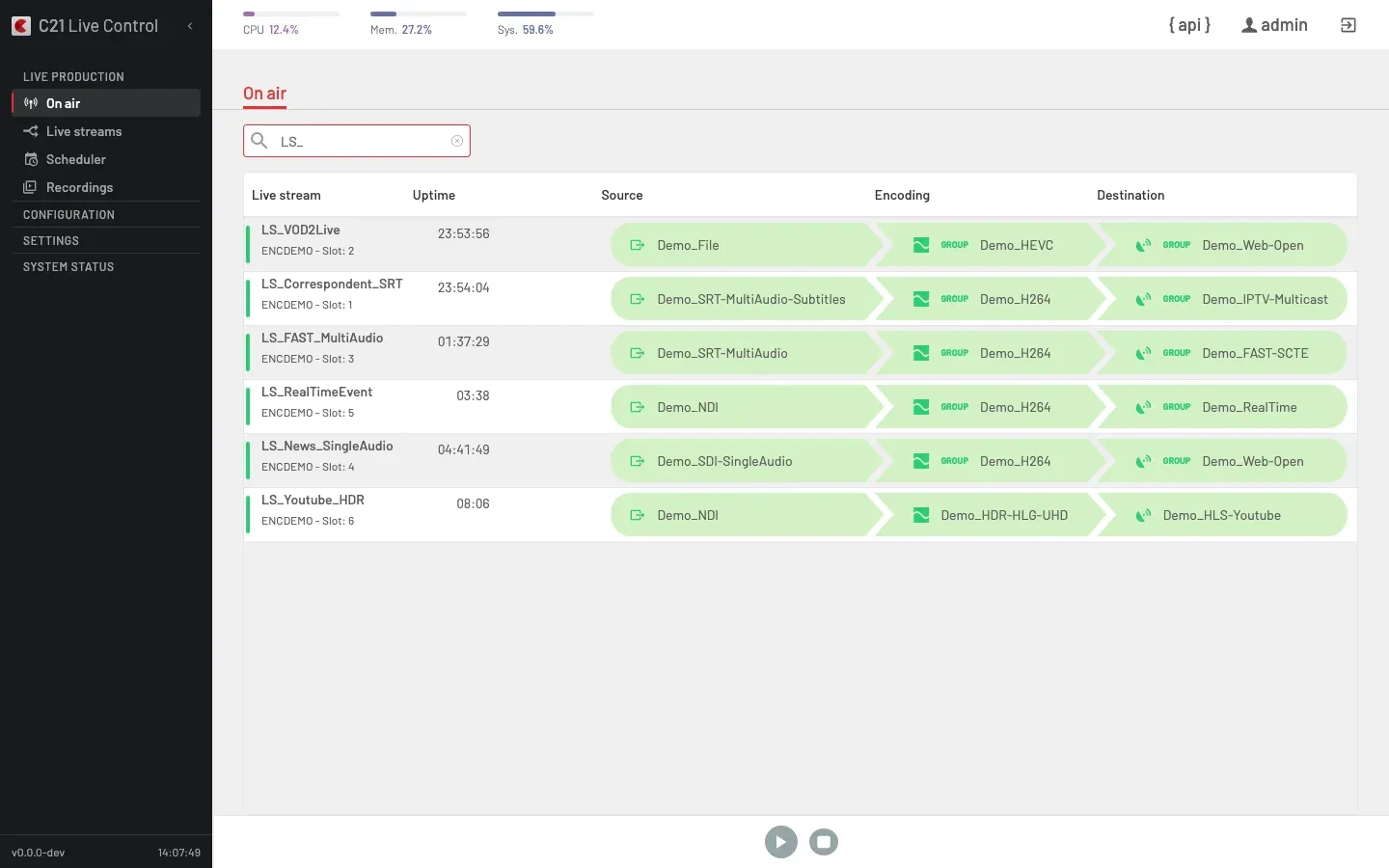
The On air view is the live status list of every Live stream currently running. Each row links a Channel, an Encoding (or Encoding group) and a Destination (or Destination group). Selecting a row expands an inline runtime panel with five tabs — Destinations, Preview, Logo, Blackout, Source switch — that drive the runtime control surface of the broadcast without stopping it.
For integrators, the same runtime surface is reachable through eight POST /c21apiv2/livestreams/{id}/runtimeOptions/* endpoints, including the metadata-push capability used to inject SCTE-35 cues and ID3 tags into a running stream. The eight endpoints, the three of them that are API-only, and the shared response semantics are documented at the end of this page.
Access
- Route:
/liveStreams/onAir. - Required role: any authenticated user (Operator or System Administrator).
How the list refreshes
The list polls the server every 5 seconds. The cadence is hard-coded — there is no per-user setting and no manual refresh button. Rows are filtered server-side so the page shows:
- every Live stream whose
LiveStream.statusis1(running), plus - every C21 Live Cloud broadcast still provisioning its cloud encoder (the row appears with the cloud spinner until the encoder comes up).
A Live stream that the Scheduler started shows a calendar icon next to the encoder name on its row.
Search
The toolbar exposes a free-text search field — type a substring and rows update after a brief pause. The only search key is name — there are no status, encoder, destination or tag filter chips.
List columns
Six columns, in this order:
| Column | Header | Notes |
|---|---|---|
| 1 | (status indicator, no label) | A coloured vertical strip on the left edge of the row reflects the broadcast's overall health. |
| 2 | Live stream | The Live stream's name and the encoder/slot it is running on. |
| 3 | Uptime | Elapsed time since the encoder reported the broadcast as live. |
| 4 | Source | The bound Channel name, with an arrow whose colour reflects the input state. |
| 5 | Encoding | The bound Encoding (or Encoding group) name; one indicator per rendition. |
| 6 | Destination | The bound Destination (or Destination group); per-destination health. |
When a destination has both primary and backup paths configured and the encoder reports an upstream problem on a path that is currently enabled, the row's destination tooltip prefixes the upstream message with "Primary: " or "Backup: ".
Empty state
When no Live streams are running and no cloud broadcast is provisioning, the page renders:
No live streams running Start a live stream from the Live streams tab to see it here.
Row selection
Click a row to select it. Selecting a row expands its inline runtime panel below the row. Clicking the same row again collapses the panel. Only one row at a time can be expanded.
Stop a Live stream
On air only stops running Live streams; the start action lives on the Live streams list.
The Stop action prompts differently depending on whether the broadcast was started by hand or by the Scheduler.
Regular Live stream.
Do you want to stop this Live stream?
On confirm, the UI tears down the preview pipeline (if it was open) and stops the broadcast.
Scheduled Live stream.
Do you want to stop this Scheduled Live stream? The associated Schedule will be deleted.
For a scheduled broadcast, confirming also deletes the active Schedule — the broadcast was kept running by the Scheduler, so removing the Schedule stops it as a side effect. The Scheduler entry is gone after this; to bring the same recurrence back, recreate it from the Scheduler.
Public-API equivalent. POST /c21apiv2/livestreams/{id}/stop (operationId stopLivestream). The public stop endpoint stops the broadcast but does not touch any Schedule. To stop a scheduled broadcast and remove its Schedule in one move, mirror the UI flow: list Schedules for the Live stream, delete the active one, and the broadcast stops as a side effect.
Per-row runtime panel
When a row is selected, an inline panel renders below the row with five tabs. The tabs are in this order — they match the icons rendered on the row's runtime cluster:
| Tab | Icon | Backed by |
|---|---|---|
| 1. Destinations | publishing.svg | runtimeTogglePublishings |
| 2. Preview | monitor-eye.svg | Operator-only embedded preview (not on the public API) |
| 3. Logo | logo.svg | runtimeApplyLogo |
| 4. Blackout | blackout.svg | runtimeApplyBlackout |
| 5. Source switch | export.svg | runtimeApplySourceSwitch |
Each tab is described in its own subsection below.
Destinations — toggle primary / backup per destination
Per-Destination toggle of the primary and backup paths on the running broadcast.
- Endpoint:
POST /c21apiv2/livestreams/{id}/runtimeOptions/publishings— operationIdruntimeTogglePublishings. - Body shape:
{ "toggles": [{ "entry_point_id": <id>, "primary": <bool>, "backup": <bool> }, …] }. - Capability split. A Destination with a configured backup URL (typically RTMP, SRT, FMS, HLS, IPTV and STREAM destinations) has independent
primaryandbackupflags — both can be on at the same time. A single-channel Destination whose backup URL is empty (Record, SDIOUT, STREAM without backup) usesprimaryas the on/off toggle and acceptsbackuponly for symmetry. - Runtime membership. Destinations added to the bound Destination group while the broadcast is on air appear here automatically — the panel refreshes every few seconds — joined switched off. Turn one on to engage it live, no restart. See Editing a group in use.
- Restriction. Only the on/off state is mutable while the broadcast is running. To change which renditions a Destination emits or which audio tracks it carries, stop the Live stream with
POST /c21apiv2/livestreams/{id}/stop, edit it withPUT /c21apiv2/livestreams/{id}, and start it again.
See also: Toggle a Destination mid-broadcast.
Preview — operator-only embedded viewer
The Preview tab opens an embedded viewer inside the runtime panel. The renderer is started by the UI and torn down again when the tab closes or the row is collapsed.
Not part of the public API. The endpoint that powers the preview is deliberately kept off the public OpenAPI spec — the contract is reserved for the in-product viewer where the UI manages the renderer lifecycle. Integrators that need an external preview of a running broadcast must add a real Destination (HLS, DASH or one of the streaming destinations) on the Live stream and read it from the published URL.
Logo — apply or clear the logo overlay
Apply or clear a logo overlay on the running broadcast.
- Endpoint:
POST /c21apiv2/livestreams/{id}/runtimeOptions/logo— operationIdruntimeApplyLogo. - Body shape:
{ "logo": { "filename": "<asset filename>", "position": "<LogoPosition>" } }. - Position values. Canonical enum:
Center,Left,Right,Top,Bottom,Top-Left,Top-Right,Bottom-Left,Bottom-Right. The legacy bitmask integer is still accepted on input for compatibility with the Vue UI; responses use the canonical string. - Clear the logo. Send an empty
filenameand keep the previousposition. The position is preserved for a later call to bring the logo back. - Response. Standard envelope with
data: null— runtime operations do not echo the applied state. To confirm the logo is what you expect,GET /c21apiv2/livestreams/{id}and inspect the Logo property of the Live stream.
The Logo tab uses the Logos catalogue as its filename source.
See also: Apply a logo overlay to a running Live stream.
Blackout — switch the program between live, black frame and file
Replace the live output with a black frame or a static file, or resume the live input. The blackout can optionally preserve the live audio while only the video is replaced — used for radio-as-video broadcasts where the visual track changes through the day but the audio is always the live input (see Broadcast radio as video).
- Endpoint:
POST /c21apiv2/livestreams/{id}/runtimeOptions/blackout— operationIdruntimeApplyBlackout. - Body shape:
{ "mode": "Live" | "BlackFrame" | "File", "file"?: "<filename>", "keep_input_audio"?: <bool> }. Live— return to the live input.BlackFrame— replace the output with a black frame.File— replace the output with the media file referenced byfile;fileis required in this mode.keep_input_audio— optional flag, applicable in any mode other thanLive. Whentrue, the slate is generated video-only and the live audio of the input Channel is forwarded untouched. When omitted orfalse, the slate carries both video and audio (legacy behavior). Idempotency takes this flag into account — switching from(BlackFrame, false)to(BlackFrame, true)is a real transition, not a skip.- The accepted-but-deprecated alias
Black Frame(with a space) is preserved on write for backwards compatibility. New integrations useBlackFrame. - Error code. Omitting
fileinFilemode, including a path separator or pointing at a file the encoder cannot reach returnsAPIf517. - Response data.
{ mode, file, keep_input_audio, applied_at, changed, warning? }.changed: falsemeans the broadcast was already in the requested state (idempotent skip).warningis present only when the encoder did not acknowledge in time; the new state is persisted and the encoder reconciles on its own.
Compatibility. The UI disables the Blackout tab with a "not supported" message when the running broadcast cannot accept a blackout. Reasons surfaced today:
| Reason code | What it means |
|---|---|
invalid_codec | The bound Encoding's video codec is not H.264 or HEVC. Blackout relay only supports those two codecs. |
hevc_above_1080p | The Encoding is HEVC at a resolution above 1080p. Blackout relay corrupts the stream in that combination. |
hevc_hdr | The Encoding is HEVC with HDR active. |
hevc_hdr_above_1080p | The Encoding is HEVC with HDR and above 1080p. |
See also: Black out or replace the program on a running Live stream.
Source switch — change the input on a running broadcast
Change the input Channel of the running broadcast without stopping the Destinations.
- Endpoint:
POST /c21apiv2/livestreams/{id}/runtimeOptions/sourceSwitch— operationIdruntimeApplySourceSwitch. - Body shape:
{ "channelId": <integer Channel id> }. - Response data.
{ channelId, applied_at, changed, warning? }.changed: falsemeans the broadcast was already pointing at this Channel.warningis present only when the encoder did not acknowledge in time; the new Channel is persisted on the running Live stream and the encoder reconciles on its own.
Eligibility rules. The backend enforces every rule with HTTP 422. The UI mirrors them so the tab is disabled when a switch is not possible.
- The Live stream is running.
LiveStream.statusmust be1(Live). A stopped broadcast cannot be source-switched — edit the bound Channel from the Live stream's configuration and start it again. - The destination Channel is reachable from the encoder running the broadcast. A Channel pinned to a different encoder Device fails with
APIf526. VirtualChannel.typevalues —SRT,Stream,RTMP-Push,SRT Cloud,UDP-R Cloud,NDIandYoutube Live— have no encoder pin and are reachable from any encoder. - The destination Channel has the same Channel type as the current source. Cross-type swaps (SRT → Youtube Live, Stream → NDI, …) are not supported online and fail with
APIf527. To change Channel type, stop the broadcast, edit the bound Channel, and start it again. - The current source type is one of the online-switch-supported types. Supported
Channel.typevalues for the current source:SRT,Stream,RTMP-Push,SRT Cloud,UDP-R Cloud,NDI,Youtube Live. Unsupported:SDI,AES/EBU,File— a switch attempt while one of these is the live source fails withAPIf528. - A
Streamsource uses a protocol the switch can relay. RTMP, HLS (.m3u8), MPEG-TS over HTTP (.2ts), MPEG-TS over UDP (udp://), HTTP progressive audio (.aac/.mp3), UDP-R or SRT. Other protocols — RTSP, for example — are refused.
The UI groups the three cloud-push variants (RTMP-Push, SRT Cloud, UDP-R Cloud) under the umbrella label Stream – C21 Live Cloud in the Channel type picker; the eligibility checks above resolve against the underlying enum values. See Sources for the full Channel.type enum.
Idempotency. Posting the same channelId that is already live returns 200 with changed: false and does not generate encoder traffic.
No effect on the configured source. The switch writes only the runtime mirror of the source. A subsequent stop and start reverts to the source configured on the Live stream — to keep the new Channel after a restart, edit the Live stream's bound Channel as well.
See also: Switch the source of a running Live stream.
API surface — every runtime endpoint on one page
Eight POST endpoints sit under /c21apiv2/livestreams/{livestreamId}/… and cover both the config-level options that are persisted on the Live stream and the runtime-only operations that drive a running broadcast. The table below groups them, names the canonical operationId, and flags which ones the UI surfaces — three of them are API-only and have no first-class UI caller today.
| Path suffix | operationId | UI Interface | What it does |
|---|---|---|---|
/options (PUT or POST) | updateLivestreamOptions / updateLivestreamOptionsPost | Indirect — persisted from configuration flows, not from the On air page | Persists the logo, overlay and scte union on the Live stream configuration. Supports Idempotency-Key. Cross-field rule: scte.cuepoints: true requires non-empty scte.blackout (APIF519); an empty body returns APIf001. |
/runtimeOptions/logo | runtimeApplyLogo | Logo tab | Apply or clear the logo overlay on a running broadcast. |
/runtimeOptions/text | setLivestreamText | API-only | Apply or update the text/crawl overlay on a running broadcast. Supports date-format tokens %d %m %Y %H %M %S %C, font, size, color, absolute x/y offsets, date_offset. |
/runtimeOptions/blackout | runtimeApplyBlackout | Blackout tab | Switch the program between Live, BlackFrame or File. |
/runtimeOptions/sourceSwitch | runtimeApplySourceSwitch | Source switch tab | Change the input Channel on a running broadcast. |
/runtimeOptions/metadata | runtimePushMetadata | API-only | Inject metadata, SCTE-35 cues, ID3 tags into a running broadcast. See subsection below. |
/runtimeOptions/ad-values | runtimeSetAdValues | API-only | Configure runtime ad-pod durations: default_ad_duration, max_ad_duration, next_ad_duration (all in seconds, all optional — omitted fields keep their previous value). |
/runtimeOptions/publishings | runtimeTogglePublishings | Destinations tab | Toggle per-Destination primary / backup state on the running broadcast. |
For the full API reference of each endpoint see API → Live streams reference. For per-stream configuration of logo, overlay and scte at definition time, see Live stream options.
Authentication and roles
Every runtime endpoint requires an authenticated session. The header is the standard bearer:
Authorization: Bearer <YOUR_API_TOKEN>
The two product roles that can mutate Live streams are System Administrator and Operator — both can call every runtime endpoint listed above. There are no per-endpoint scopes beyond the role gate. For the role model and how to mint tokens, see Authentication.
Response semantics (shared)
Two of the endpoints — runtimeApplyBlackout and runtimeApplySourceSwitch — return a response envelope that carries two fields integrators should know about:
changed—falsewhen the requested state already matched the persisted state. The call is an idempotent skip and no encoder traffic is generated.warning— present only when the encoder did not acknowledge in time. The new state is persisted on the Live stream and the encoder reconciles on its own; treat the response as a soft success.
The other runtime endpoints return the standard envelope with data: null (or, for runtimeTogglePublishings, a small confirmation block listing the updated entry points).
Metadata push — runtimePushMetadata
Inject a single metadata event into a running broadcast. The handler forwards the payload to the encoder's metadata pipeline and returns the standard envelope with data: [] — the call is fire-and-forget and the injected payload is not echoed back.
- Endpoint:
POST /c21apiv2/livestreams/{id}/runtimeOptions/metadata. - Body shape:
{
  "type": "<one of the eight type values>",
  "metadata": { "name": "<string>", "value": "<string>" }
}
typevalues (exactly eight, case-sensitive):
| Value | Used for |
|---|---|
Metadata | Generic name/value metadata. metadata carries the payload. |
CuePoint | Generic cue point. metadata carries the payload. |
DateRange | Date-range marker (HLS EXT-X-DATERANGE family). |
ID3Tag | ID3 tag emitted in-band on HLS. |
CueIn | Generic cue-in boundary. metadata is optional. |
CueOut | Generic cue-out boundary. metadata is optional. |
ScteIn | SCTE-35 splice in. metadata is optional. The server normalises the value (e.g. ScteIn → scte-in). |
ScteOut | SCTE-35 splice out. metadata is optional. Same server-side normalisation as ScteIn. |
metadataobject. Serialised asname=valuein the encoder command. Required forMetadata,CuePoint,DateRangeandID3Tag; optional for the four cue boundaries (CueIn,CueOut,ScteIn,ScteOut).
Examples.
Player-side ad cue via generic metadata:
curl -X POST "https://<your-host>/c21apiv2/livestreams/<livestreamId>/runtimeOptions/metadata" \
  -H "Authorization: Bearer <YOUR_API_TOKEN>" \
  -H "Content-Type: application/json" \
  -d '{
    "type": "Metadata",
    "metadata": { "name": "adbreak", "value": "preroll-30s" }
  }'
SCTE-35 splice pair around an ad break:
# enter ad break
curl -X POST "https://<your-host>/c21apiv2/livestreams/<livestreamId>/runtimeOptions/metadata" \
  -H "Authorization: Bearer <YOUR_API_TOKEN>" \
  -H "Content-Type: application/json" \
  -d '{ "type": "ScteOut" }'

# leave ad break
curl -X POST "https://<your-host>/c21apiv2/livestreams/<livestreamId>/runtimeOptions/metadata" \
  -H "Authorization: Bearer <YOUR_API_TOKEN>" \
  -H "Content-Type: application/json" \
  -d '{ "type": "ScteIn" }'
HLS ID3 tag emission:
curl -X POST "https://<your-host>/c21apiv2/livestreams/<livestreamId>/runtimeOptions/metadata" \
  -H "Authorization: Bearer <YOUR_API_TOKEN>" \
  -H "Content-Type: application/json" \
  -d '{
    "type": "ID3Tag",
    "metadata": { "name": "TXXX:show", "value": "evening-news" }
  }'
The injection happens on the next encoder tick; the marker lands on the output stream within a few seconds.
FAQ
LiveStream.status is 1 (Live). A row in any other state shows only the row, with no inline panel.hevc_above_1080p, hevc_hdr or hevc_hdr_above_1080p and disables the tab. To use Blackout, downscale the Encoding to 1080p or switch the codec to H.264.