
Groups
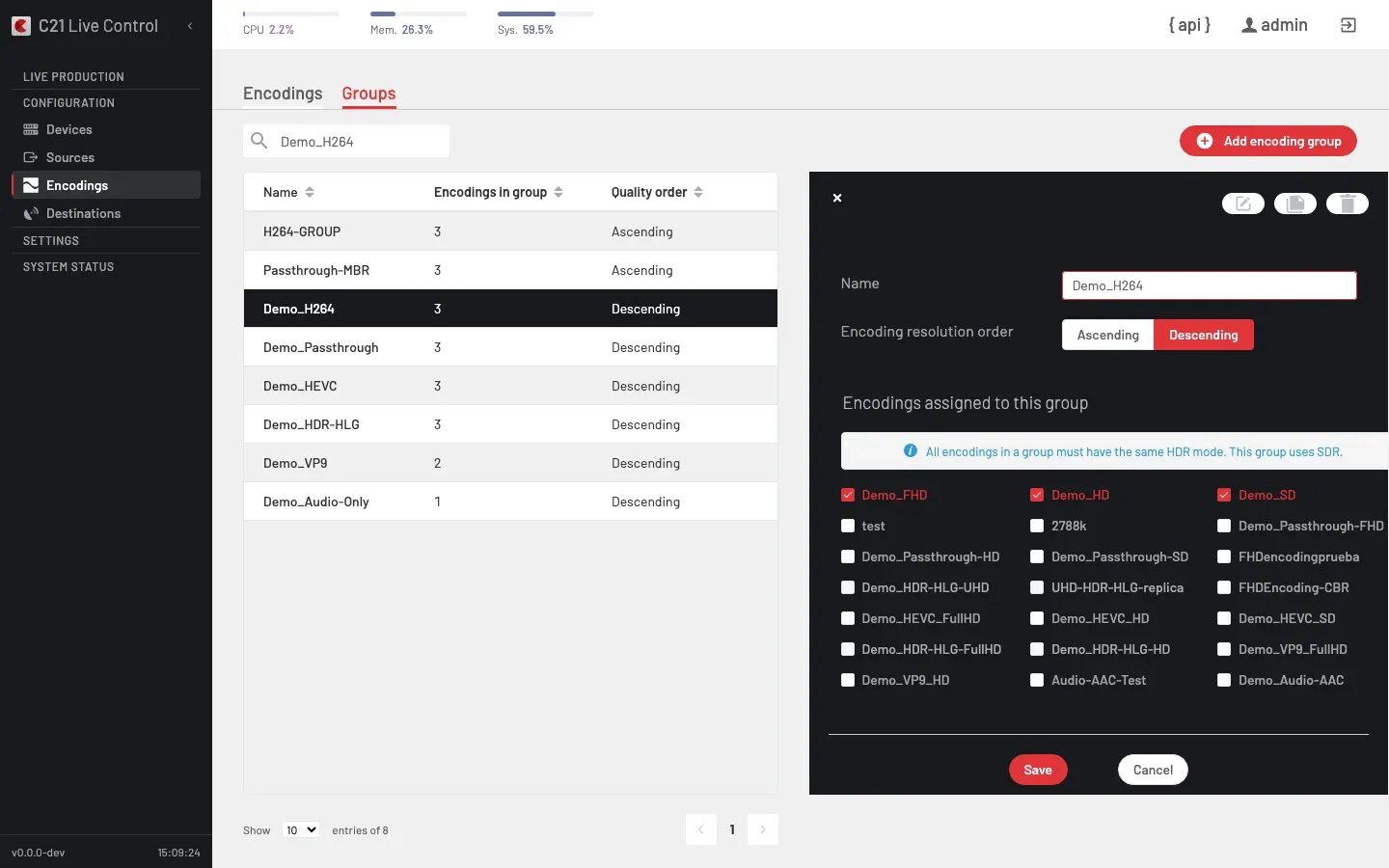
What is an Encoding group
An Encoding group is a named bundle of Encodings that share the same delivery pipeline. A Live stream that binds an Encoding group produces every member rung in parallel — the basis of adaptive-bitrate (ABR) delivery and of any multi-rate use case.
The group itself has no pipeline of its own; the API derives the pipeline from the first member on every read. The UI editor does not surface it as a separate field, but the API rejects members with an incompatible pipeline on save (DASH, HLS, STREAM, RTMP, Enhanced RTMP, SDIOUT or Record).
How it works
Define
Click Add encoding group and give the group a name. Tick the member Encodings on the editor's checkbox grid; the order they appear in the manifest is driven by each member's resolution and by the Encoding resolution order field.
Bind
Bind the group to a Live stream from the Live streams editor — pick it under the Encoding field. The editor places groups under the "Encoding groups" option group and individual Encodings under "Encodings"; either is a valid binding.
Encoding groups list
The Encodings > Groups section shows the groups in three columns: Name, Encodings in group (member count) and Quality order (Ascending or Descending, mirroring the group's Encoding resolution order value).
The search field on the Groups tab does not filter the list in the current UI release. To narrow the view, sort by Name or Encodings in group, or navigate directly to the target group from the Live streams editor.
Common options
| Option | Notes |
|---|---|
| Name | Display name reused across the UI, API and logs. |
| Members | Unordered set of Encodings picked through the editor's checkbox grid; the order they appear in the manifest is driven by each member's resolution and by Encoding resolution order. |
| Encoding resolution order | Ascending or Descending. Controls whether the manifest exposes the renditions from low to high rung or the reverse. The Encoding groups list shows this choice in the Quality order column. |
| Pipeline | Derived from the first member's pipeline and not exposed as a field in the editor. The API rejects members with an incompatible pipeline on save. |
Cross-links
- Encodings for the per-rung recipe.
- Live streams overview for the binding from a Live stream to its Encoding group.
- Destination groups for the destination-side bouquet.
FAQ
pipeline from the first member and the API requires every member to share that pipeline. Mixing codecs within a pipeline (for example H.264 and HEVC on the same HLS ladder) is technically possible but limits downstream player compatibility; pick one codec family per group for production-grade ABR.