
Encodings
What is an Encoding
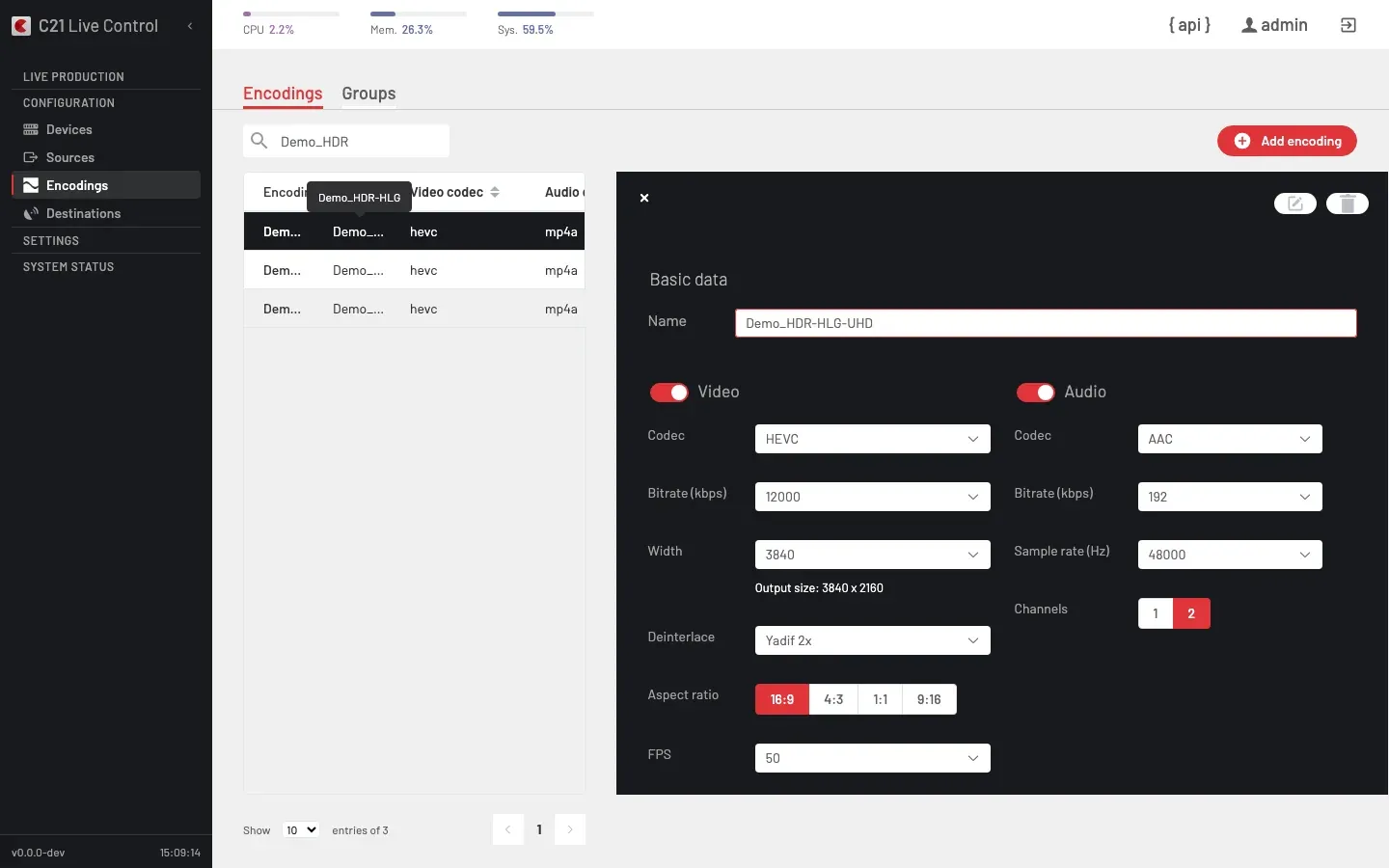
Encodings is the section of the left rail that catalogues encoding recipes. The underlying entity is an Encoding: the recipe C21 Live Control hands to the encoder when it starts a Live stream. An Encoding bundles its video settings and its audio settings; it carries no Channel binding and no Destination binding. The same Encoding can be reused across many Live streams, alone or as one rung of an Encoding group for multi-rate delivery.
The Encodings section carries two tabs in the toolbar: Encodings (individual profiles) and Groups (ABR ladders). See Encoding groups for the latter.
How it works
Define
Click Add encoding in the toolbar. The editor exposes two blocks of settings: Video and Audio. Either block can be marked inactive on an audio-only or video-only Encoding.
Bind
Bind the Encoding to a Live stream from the Live streams editor — pick it under the Encoding field. Alternatively, attach it to an Encoding group as one rung of an ABR ladder.
Video settings
| Field | Notes |
|---|---|
| Active | Whether video encoding is active. |
| Codec | One of h264, hevc, vp9, copy, logo. The copy value is passthrough — no re-encoding. h265 is accepted on write as an alias for hevc. The logo value transcodes a still image or short clip as H.264 video while the audio chain remains the live input — used for radio-as-video broadcasts where the operator wants a programmable visual track over a live audio source (see Broadcast radio as video). |
| Bitrate | Target video bitrate in kbps. |
| FPS | Frame rate. The value 0 means "copy source frame rate". |
| Size width | Output width in pixels; height is derived from the source aspect ratio. |
| Aspect ratio | One of 16:9, 4:3, 1:1, 9:16, 11:9. |
| Deinterlace | One of disabled, yadif, yadif2x, bwdif, interlaced_tff. off is accepted as an alias for disabled. |
| H.264 profile | When codec = h264: baseline, main or high. |
| H.264 level | When codec = h264: 0 (auto), 1.0 … 5.1. |
| Keyframe interval | Keyframe cadence in frames. |
HDR settings live in their own fieldset — see Color & HDR below.
Audio settings
| Field | Notes |
|---|---|
| Active | Whether audio encoding is active. |
| Codec | One of mp4a (AAC), copy. The legacy human label AAC is accepted as an alias on write. |
| Bitrate | Audio bitrate in kbps. |
| Channels | 1 (mono) or 2 (stereo). |
| Sample rate | One of 22050, 44100, 48000 Hz. |
Color & HDR
The Color & HDR fieldset of the Encoding editor controls the colour space and high-dynamic-range mode applied to the encoded stream. It is visible only when the video codec is HEVC — switching the codec away from HEVC resets the mode to SDR.
UI form
The form is a two-step picker:
- Color Mode — SDR (BT.709), BT.2020 (10-bit), or HDR.
- HDR Mode (sub-selector, only when Color Mode is HDR) — HLG or HDR10.
| Color Mode | HDR Mode | API value (hdr_mode) |
|---|---|---|
| SDR (BT.709) | — | sdr |
| BT.2020 (10-bit) | — | bt2020_sdr |
| HDR | HLG | hlg |
| HDR | HDR10 | hdr10 |
Mode reference
| Mode | Bit depth | HEVC profile | Color space | Transfer function | Use case |
|---|---|---|---|---|---|
sdr | 8 | Main | BT.709 | BT.709 | Standard-definition delivery — default. |
bt2020_sdr | 10 | Main10 | BT.2020 | BT.709 | Wide colour gamut without HDR brightness. |
hlg | 10 | Main10 | BT.2020 | ARIB STD-B67 | Broadcast HDR — backward compatible with SDR displays. |
hdr10 | 10 | Main10 | BT.2020 | SMPTE ST 2084 (PQ) | Cinema-grade HDR with static metadata. |
HDR10 static metadata (Mastering Display, MaxCLL, MaxFALL) is propagated from the input source when present. Encoded inputs (SRT, UDP, RTMP) carry the metadata in the bitstream; SDI inputs do not carry it and only VUI colour signalling is applied.
Hardware requirement
HDR encoding requires a GPU encoder (NVIDIA NVENC) or a VPU encoder (Netint Quadra) on the Device. CPU-only encoders do not support HDR. When an HDR mode is configured on a CPU-only encoder, the encoder falls back to SDR and surfaces a warning.
On the Start Live stream view, encoder groups containing only CPU-only Devices are disabled with an explanatory message when any encoding on the bound Live stream carries an HDR mode.
Destination compatibility
| Destination type | HDR support |
|---|---|
| CMAF | Supported (DASH + HLS fMP4 with VIDEO-RANGE and CICP signalling). |
| DASH | Supported (CICP SupplementalProperty in the MPD). |
| SRT | Supported (colour metadata in the HEVC bitstream VUI). |
| STREAM (UDP / RTP) | Supported (MPEG-TS — colour metadata in VUI). |
| Enhanced RTMP | Supported (HEVC over Enhanced-RTMP — HDR metadata in VUI / SEI). |
| HLS / TS | Supported (HEVC 10-bit in TS with VIDEO-RANGE=PQ/HLG and hvc1 codec attribute). Operators must verify the receiving CDN or endpoint accepts HEVC in TS; legacy H.264-only HLS endpoints will reject the stream. |
| RTMP | Not supported (RTMP does not carry HEVC). |
| Record | Not supported (Recording stores H.264 only). |
| SDIOUT | Not supported. |
Logo overlay restriction
The logo overlay is automatically disabled in two combinations:
- 4K inputs (3840×2160), at any HDR mode — including SDR.
- Any HDR output active (
bt2020_sdr,hlg,hdr10), at any resolution.
When a logo is required on an HDR broadcast, it must be burned into the source upstream of the encoder. Logo overlay continues to work normally for SDR inputs up to 2560×1440.
Blackout / SCTE / ID3 restriction
The runtime blackout, SCTE and ID3 surfaces are automatically disabled when any active output is HEVC above 1080p (width > 1920 or height > 1080) or HEVC with HDR active (any mode other than sdr). The frontend disables the Blackout button on affected Live streams — see On air → Blackout tab.
Encoding group rules
Inside an Encoding group:
- Every encoding in the group must share the same
hdr_mode. The Encoding group editor only lets you add encodings with the group'shdr_mode; the others are shown disabled. - HDR cannot be combined with
h264or with interlaced (interlaced_tff) encodings in the same group.
List badge
The Encodings list displays a mode-specific badge on each encoding whose hdr_mode is not sdr: BT.2020, HLG or HDR10.
Cross-links
- Encoding groups for ABR ladders and multi-rate sets.
- Live streams overview for the binding from a Live stream to its Encoding.
- Devices for the hardware paths each codec and HDR mode requires.
- On air — the Blackout tab eligibility rules that the HEVC / HDR restriction affects.
FAQ
codec to copy and the audio codec to copy. The encoder forwards the source bitstream without re-encoding.hevc to reveal it. When the codec changes away from HEVC, the HDR mode is reset to sdr automatically.