
Sources
What is a Source
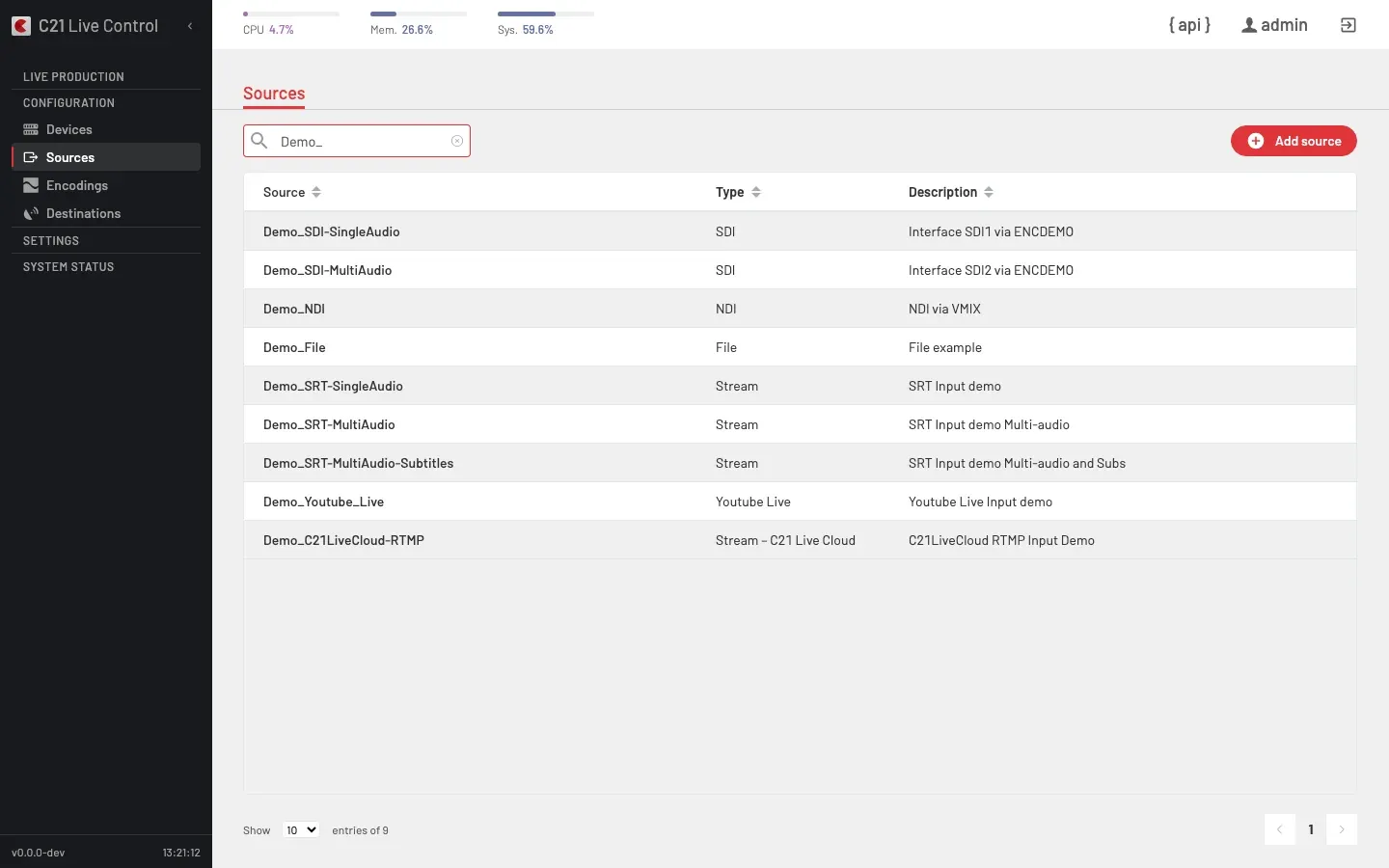
Sources is the section of the left rail that catalogues every input feed C21 Live Control can ingest. The underlying entity is a Channel — the object the API manipulates and the editor edits. The two terms appear together throughout the UI: the list toolbar action is "Add source", and the editor edits a Channel.
A Channel is independent from the Live stream that consumes it: the same Channel can feed many Live streams (one at a time per Live stream binding).
How it works
Define
Click Add source and fill the editor. The Channel type field is the most important choice — every other field depends on it.
Bind
From the Live streams editor, pick this Channel in the Source field. The same Channel can be bound to many Live stream definitions.
Channel types
Channel.type exposes a fixed set of values. The customer-facing grouping is:
| Type | Notes |
|---|---|
| File | A media file replayed continuously as a live signal. Useful for slates, intros, fallback loops and tests. |
| SDI | Physical SDI input on a studio encoder. |
| AES/EBU | Standalone digital audio input. |
| NDI | An NDI stream advertised on the local network. The editor can discover sources automatically or accept a manually-typed stream name. |
| SRT | Contribution from the field or a partner relay, in caller or listener mode, with optional encryption and configurable latency. |
| Stream | IP pulls over HLS, RTMP, HTTP, RTP or UDP multicast (for example udp://@239.0.0.1:1234 or an https:// HLS playlist). |
| Stream – C21 Live Cloud | Push-mode ingest that terminates on the C21 Live Cloud platform. Three transport variants are accepted: RTMP, SRT and UDP-R. The Channel description in the list shows which specific subtype is in use (for example Stream – C21 Live Cloud with description C21LiveCloud RTMP Input Demo for an RTMP-Push entry). |
| Youtube Live | Ingest a publicly-visible YouTube Live broadcast by its 11-character Video ID. Gated by the C21LiveYouTube license. See the Youtube Live subsection below for the channel-type detail. |
The underlying API enum (File, SDI, Stream, AES/EBU, RTMP-Push, UDP-R Cloud, SRT, SRT Cloud, NDI, Youtube Live) is stable across releases; the customer-facing Stream – C21 Live Cloud category groups the cloud contribution variants (RTMP-Push, SRT Cloud, UDP-R Cloud) under a single entry that the UI presents as one Channel type.
Youtube Live
A Channel of type Youtube Live ingests a publicly-available YouTube Live broadcast as the source of a Live stream. The encoder runs a dedicated auxiliary ingest that pulls the broadcast and republishes it onto the encoder's internal bus; from there the transcoding and publishing chain treats it like any other input.
License gate
The channel type is gated by the C21LiveYouTube license. Without it:
- The Youtube Live option is hidden from the Channel editor's type picker.
- The user-session flag the UI checks (
hasYoutubeLicense) isfalse. - API calls that create or convert a Channel into Youtube Live are rejected with
APIf807(HTTP 403).
The Youtube Live value remains in the OpenAPI Channel.type enum regardless of license state — the contract is stable; only mutations are gated.
Video ID, not stream key
The operator supplies the public 11-character Video ID from the broadcast URL — the value after ?v= in youtube.com/watch?v=<id> or after / in youtu.be/<id>. This is not the YouTube Studio RTMP stream key used to push from OBS to rtmp://a.rtmp.youtube.com/live2/<KEY>. Stream keys are private credentials of the broadcaster; this feature ingests the public consumer side of the broadcast.
| Property | Value |
|---|---|
| Format | Exactly 11 characters. |
| Charset | [A-Za-z0-9_-] (URL-safe Base64). |
| Regex | ^[A-Za-z0-9_-]{11}$. |
| Examples | jfKfPfyJRdk, b4tE5aKhtlg. |
Submitting a value that does not match the regex is rejected with APIf001.
Channel editor
The Channel editor renders only the canonical fields plus the Video ID:
| UI label | API field | Notes |
|---|---|---|
| Name | name | Display name. |
| Description | description | Optional. |
| Alias | alias | Optional alias. |
| YouTube Video ID | settings.youtube_video_id | The 11-character Video ID. |
Multi-audio, subtitle and audio-track configuration are hidden for this type — the channel accepts none of them. The editor displays an inline hint next to the field stating "This is the public Video ID of a YouTube Live broadcast — not a stream key from YouTube Studio."
Detail panel
The Channel detail page shows the Video ID and a derived Watch URL (https://www.youtube.com/watch?v=<id>) so an operator can confirm the broadcast in a browser.
Network considerations
YouTube enforces an anti-bot challenge on requests it considers risky, primarily based on the reputation of the source IP. In practice:
- Commercial ISP / residential IPs (where most on-prem encoder installations live) typically pass without challenge.
- Datacenter / cloud / VPS IPs are routinely challenged; the ingest fails until the deployment is allowed past the challenge.
When the deployment lives on a flagged network, a cookies file exported from a logged-in YouTube account can be deployed on the encoder side to bypass the challenge. The exact deployment path is install-side detail — see the encoder operator runbook with your Cires21 representative.
Source on hold
When the broadcast has not started yet, has ended, is not a live broadcast, is private or removed, or is blocked by the anti-bot challenge, the input is held instead of relaunched: the Live stream shows amber (warning) with a status text that names the cause. See Ingest a YouTube Live broadcast → Troubleshooting.
Cross-links
- Ingest a YouTube Live broadcast — step-by-step how-to (UI + API).
- Licenses — the C21LiveYouTube license model.
Common options
| Option | Notes |
|---|---|
| Name | Stable identifier reused across the UI, API and logs. |
| Type | One of the values above. |
| Endpoint / URL | Listener URL, caller target, HLS playlist URL, file path or NDI stream name — depending on the type. |
| Authentication | SRT passphrase (with AES-128 / AES-256), HTTP credentials for Stream pulls, and any provider-specific credential the chosen type requires. |
| Listening vs calling | For SRT, whether Live Control listens for the publisher or dials out to it. |
| Latency target | SRT latency window (ms); shapes loss recovery vs end-to-end delay. |
| Enabled | Disable a Channel without deleting it. |
Cross-links
- Live streams overview for the binding from a Live stream to its bound Channel.
- Devices for the physical encoders that host SDI / AES/EBU inputs.