
Groups
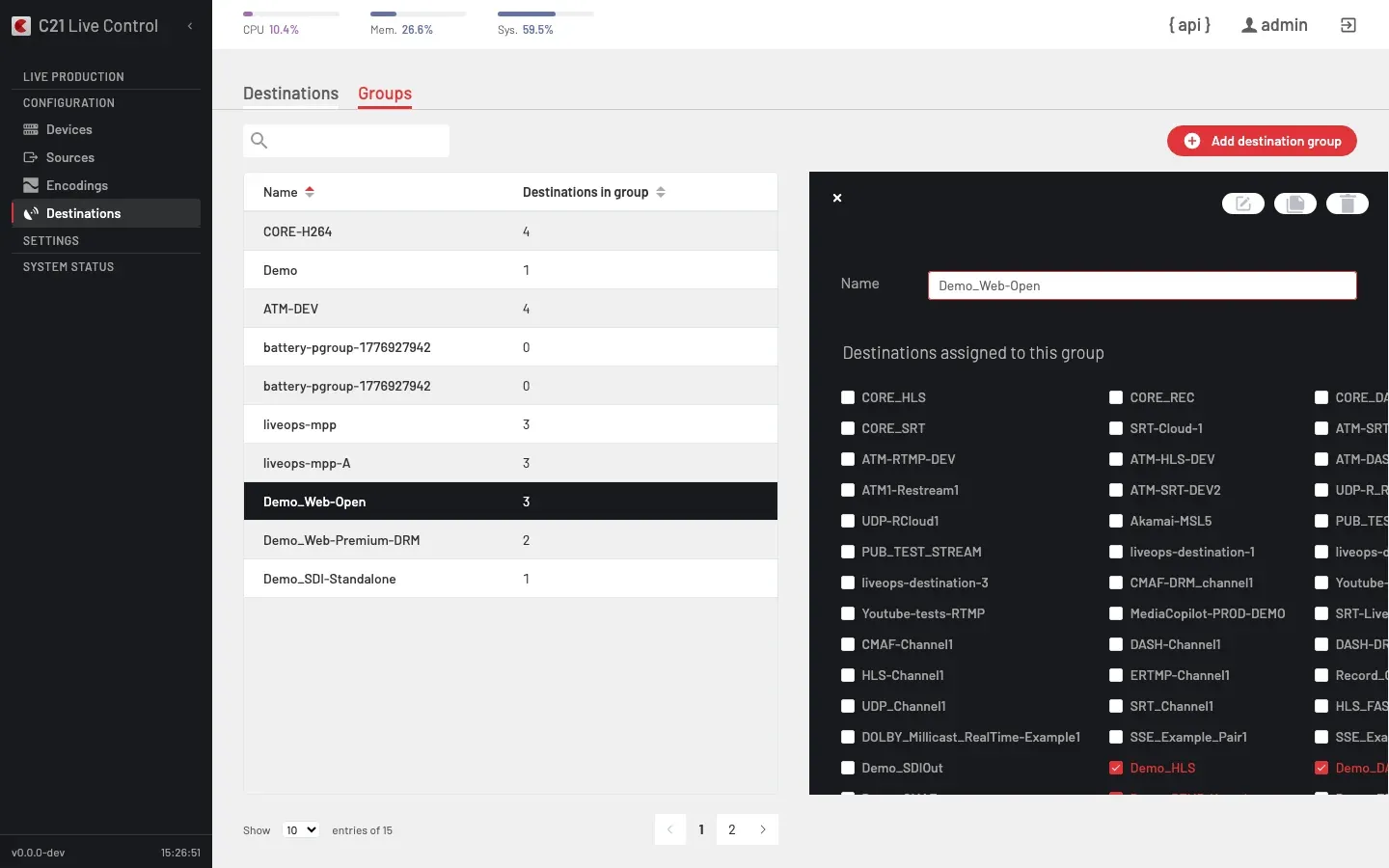
What is a Destination group
A Destination group is a named bundle of Destinations a Live stream pushes to in parallel. Binding a Destination group to a Live stream wires every member at once and lets the Operator toggle individual members on or off at runtime without unbinding the bouquet.
A Destination group is independent from the Live streams it backs. The same group can back many Live streams, and the same Destination can sit in many groups.
Pool model and slots
A group is a pool: it can hold up to 20 Destinations, regardless of how many publishing points the Encoder is licensed for (Multi Publishing Points). The licence governs how many members can be active at the same time, not how many the group can hold. Active members always hold a slot up to the licensed count; stopped members share whatever slots are left, so turning one on may take the slot of a stopped one. No active Destination is ever dropped to make room.
How it works
Define
Click Add publishing group and pick the members. The group exposes only the canonical fields:
| Field | Notes |
|---|---|
| Name | Display name. |
| Destinations assigned to this group (editor label) | Checkbox grid of every available Destination. The ticked Destinations are the active members of the group. In demo.yml and on the API this field is called members. |
Bind
Bind the group to a Live stream from the Live streams editor — pick it under the Destination field. The editor places groups under the "Destination groups" option group and individual Destinations under "Destinations"; either is a valid binding.
Search and filter
The search bar on the Groups tab accepts text but does not filter the list in the current UI release. To narrow the view, navigate directly to the target group from the Live streams editor or switch to the Destinations tab, which does support substring search.
Runtime control
Once the bound Live stream is on air, the Operator works the group from the Destinations panel of the runtime cluster, which refreshes every few seconds so membership and state edits show up without a manual reload:
- Toggle members. Turn each member's primary and backup state on or off independently. The API operation is
runtimeTogglePublishings: send a list of{entry_point_id, primary, backup}toggles and the running broadcast applies them without stopping. State only — renditions and audio tracks are immutable at runtime; to change which renditions of the bound Encoding group a Destination carries, the Live stream must be stopped. - Edit membership in use. Add or remove Destinations from a group while it backs running Live streams — see Editing a group in use.
Editing a group in use
A group can be edited while one or more Live streams are running on it, and the change applies without a stop and start.
- Add a Destination. Always allowed, up to the 20-member pool limit. On a running Live stream the new member joins switched off; turn it on from the On Air Destinations panel to engage it live. If every licensed slot is already active, the engage is refused with a
409conflict ("no free publishing slot") — stop a member first to free a slot. - Remove a Destination. Allowed only when that Destination is inactive on every running Live stream; if it is still on air somewhere, removal is refused with a
409conflict. When removal succeeds its slot is freed immediately, so the On Air panel reflects the edit at once.
409 with the reason. Add them before going on air to have them engage immediately.Cross-links
- Destinations for the per-Destination catalogue and supported types.
- Live streams overview for the binding from a Live stream to its Destination group.
FAQ
runtimeTogglePublishings to take the failing member off the air while the Live stream stays running on the rest of the group; the Live stream itself does not stop.