
Accounts
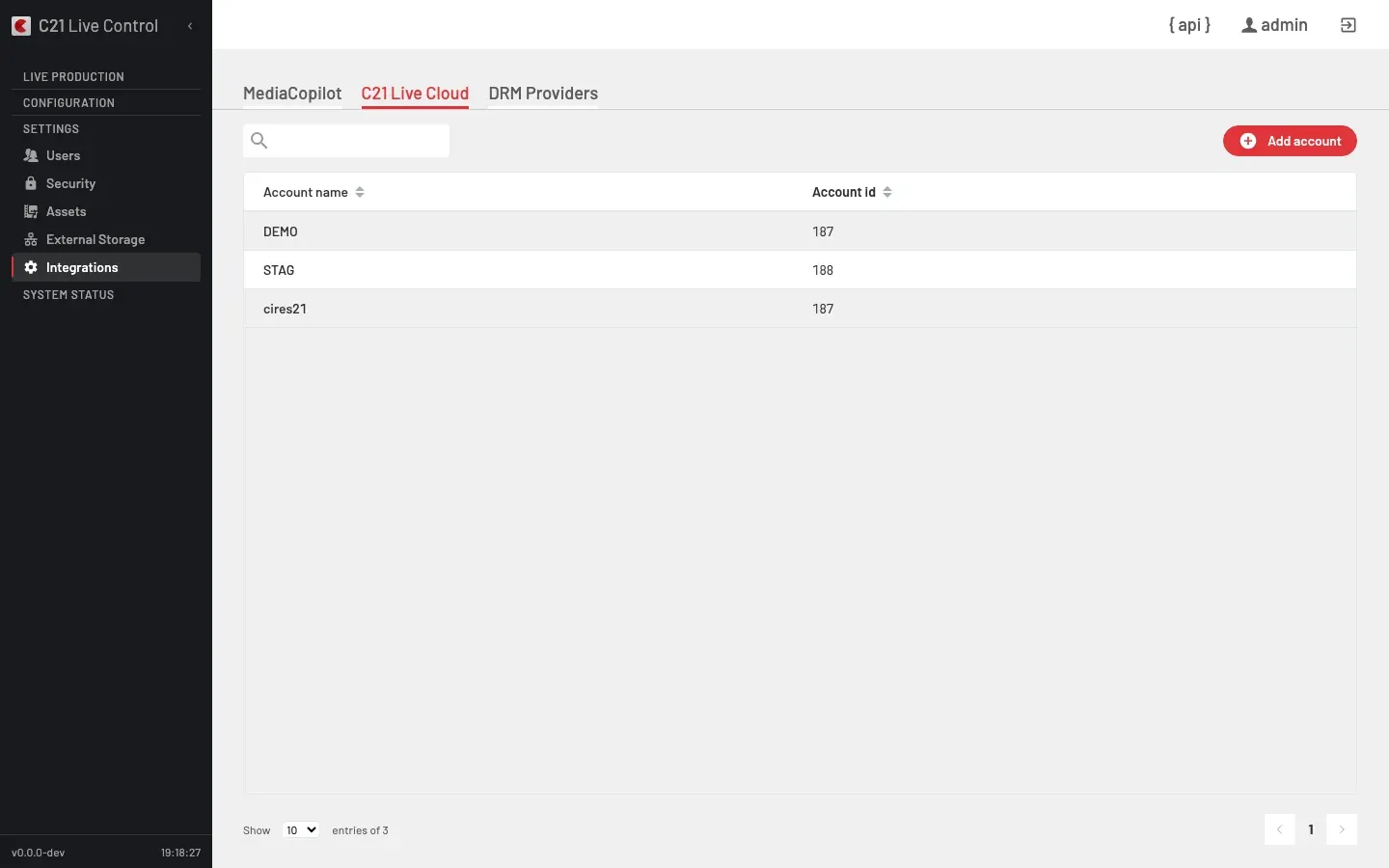
A C21 Live Cloud account is the credential record that connects a C21 Live Control instance to a C21 Live Cloud platform tenant. Registering an account unlocks the cloud-flavoured Channel and Destination variants and lets them reference this account.
The full CRUD lives under /c21apiv2/settings/integrations/c21livecloud and is gated to the System Administrator role.
Listing columns
The tab's list shows two columns:
| Column | Notes |
|---|---|
| Account name | Display name for the account. |
| Account id | Numeric identifier from the upstream platform. |
The Enabled state and the API key live in the detail form (opened by double-clicking a row), not in the list.
Account fields
| UI label | Field | Notes |
|---|---|---|
| Name | client | Human-readable display name (≤ 100 characters). Reused across the UI, API and logs. |
| Account ID | client_id | Numeric identifier provided by the upstream platform. Required at creation. |
| API key | password | Account API key. Write-only — never returned by GET. Required at creation. |
| Enabled | enabled | Whether the account is available for selection by Channels and Destinations. Defaults to true. |
The schema also exposes an owner boolean; for accounts listed under this section it is always false (the platform filters on owner = 0).
Operations
| Action | Method + path | operationId |
|---|---|---|
| List accounts | GET /c21apiv2/settings/integrations/c21livecloud | getAllC21LiveCloudAccounts |
| Create an account | POST /c21apiv2/settings/integrations/c21livecloud | addC21LiveCloudAccount |
| Read an account | GET /c21apiv2/settings/integrations/c21livecloud/{accountId} | getC21LiveCloudAccountById |
| Update an account | PUT /c21apiv2/settings/integrations/c21livecloud/{accountId} | updateC21LiveCloudAccount |
| Delete an account | DELETE /c21apiv2/settings/integrations/c21livecloud/{accountId} | deleteC21LiveCloudAccount |
| Validate credentials | POST /c21apiv2/settings/integrations/c21livecloud/{accountId}/validate | validateC21LiveCloudAccount |
Every operation requires the System Administrator role.
Register an account
Open the form
In the System Administrator UI, open Integrations → C21 Live Cloud and choose Add account.
Fill in the fields
| Field | Value |
|---|---|
| Name | A display name for this account. |
| Account ID | The numeric account identifier from the upstream platform. |
| API key | The account's API key (write-only). |
| Enabled | Leave on for normal operation. |
Save
Submitting calls addC21LiveCloudAccount. On success the new account appears in the list; the API key is hashed on the server and never returned again. The account is immediately available in the cloud Channel type pickers and in the Destination forms that accept cloud targets — the server handles the internal synchronisation between the account record and those pickers.
Validate an account
validateC21LiveCloudAccount revalidates the stored credential against the upstream platform. Use it after a credential rotation or when troubleshooting a publishing failure.
The endpoint accepts an optional body {client_id, password} if you want to test new credentials before saving them. A successful response confirms the credentials are accepted upstream; a failure returns the upstream error in the standard error envelope.
Edit an account
updateC21LiveCloudAccount is a partial update:
- Changing Name propagates the new name to the pickers that surface the account.
- Leaving API key empty preserves the stored value.
- Toggling Enabled off hides the account from the Channel and Destination pickers without deleting it.
Delete an account
deleteC21LiveCloudAccount removes the account along with any internal references the server maintains. Channels that referenced the deleted account by client_id lose that reference and will fail at start time until they are pointed at a different account.
Cross-links
- C21 Live Cloud overview — What an account is and what registering one enables.
- Sources — The Stream – C21 Live Cloud Channel type and its three protocols (RTMP, SRT, UDP-R).
FAQ
/c21apiv2/settings/integrations/c21livecloud requires the System Administrator role; Operators get 403 Forbidden.Overview
Register a C21 Live Cloud account on C21 Live Control to enable the integration; Live streams can then run on C21 Live Encoder instances provisioned automatically by C21 Live Cloud, adding elastic capacity to the deployment.
Overview
Multi-DRM protection in C21 Live Control across Widevine, PlayReady and FairPlay with CENC and CBCS packaging.